Release Notes V 9.7.6 - December 2025
1762256701637
Pilot Release Date: Tuesday, December 9/25
Production Release Date: Tuesday, December 16/25
Coming Soon!
DealerMine APIs - Introducing API access to effortlessly retrieve and utilize your data with complete flexibility. It’s your data, use it your way. More details coming soon!
Sales & Service CRM Features
New DealerMine Support Assistant: Clicking the "Contact Support" button will now open a chat window where you can ask questions and receive real time help, advice and answers. Not getting quite what you need? Just type "Contact Support" and a ticket will be created for you automatically! Stay tuned as we continue to add more and more knowledge to ensure the new DealerMine Support Assistant improves over time!
Redesigned Settings Menu: We’ve redesigned the main menu (the settings cog) to make everything easier to find. All options are now grouped in one simple menu, reducing extra clicks and helping you get to what you need faster. The new layout is cleaner, more intuitive, and makes navigating your settings a lot smoother.
Safeguards for Text and Email Batch Timing: To ensure best practices are adhered to, even if the process that runs batch text and email is slow, we have implemented time restrictions to ensure batches can never be sent outside of acceptable local hours. In addition, we have made changes to the batch setup screens to ensure batches can only be setup during acceptable hours as well. This matches voice drop logic we already have in place.
Fetch: Users can now save their own defaults for “configure fields” for each data source, so new fetches automatically use these values and eliminate the need to reconfigure each time.
OLS Fixes
To enhance data security, OLS will now display only the last 4 characters of a VIN when searching and matching to an existing profile. Previously, the last 8 characters were shown.
In OLS, the comment box appeared too low when no recommended maintenance was due. It has been moved higher for better visibility and usability.
DMS Fixes
PBS - We have implemented logic so DealerMine now recognizes the sub-opcodes that come from PBS Menu Packages, ensuring users get the correct credit for maintenance sold and verifying reports are now correctly accounting for these services.
CDK - We’ve improved the vehicle transfer process in DealerMine: if you try to add a VIN that exists on another customer’s profile, a pop-up will notify you and ask if you’d like to transfer the vehicle to the current customer, giving you the option to select Yes or No.
PBS - DealerMine now imports transportation codes from PBS, allowing them to be linked to DealerMine codes. This ensures the correct code is sent when booking appointments—for example, booking a drop-off will now send “Drop Off” instead of “D.”
QDMS - Resolved an issue where quotes could not be booked in DealerMine or pushed to QDMS due to an endpoint error. The endpoint has been updated, and quotes are now booking and transferring successfully.
Sales CRM Features
For Salespeople, Sales Managers, and BDC Representatives
We’ve made several major improvements to DealerMine Sales CRM to make it faster, clearer, and easier for you to log traffic, find customers, and stay on top of your work.
These updates will help reduce mistakes, speed up your workflow, and improve the accuracy of follow-ups and reporting.
1. Add Up Window – Completely Redesigned
What’s New
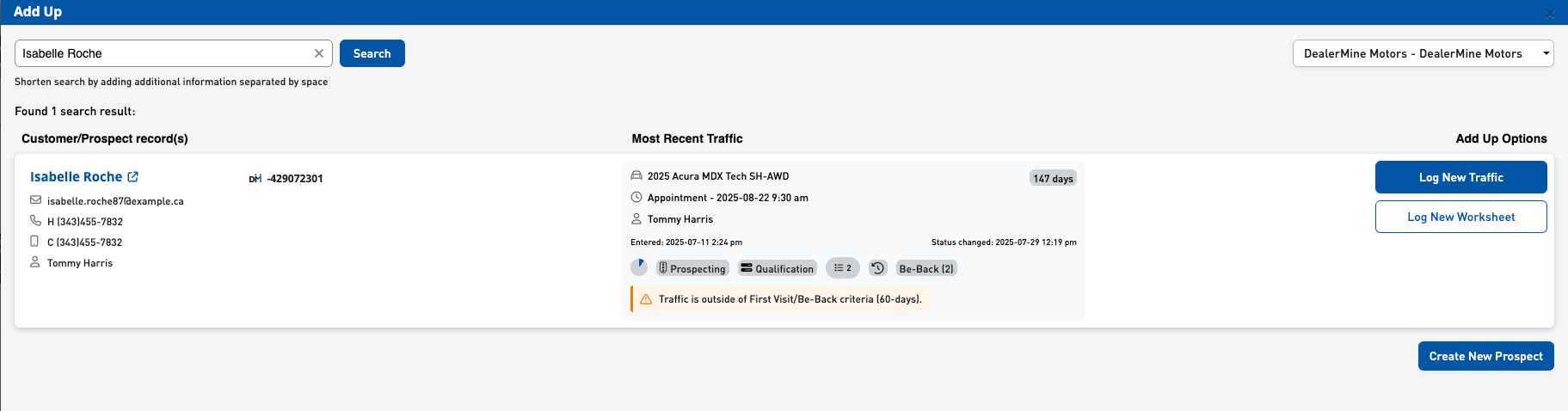
The Add Up window you use every day has been rebuilt to give you a cleaner, easier view of each customer. When you search a name or phone number, you now see:
A clearer customer/prospect card with all key details
A better summary of their most recent traffic
Simple, easy-to-understand action buttons telling you exactly what you’re allowed to do
How This Helps You
No more guessing whether a customer should be a First Visit, a Be-Back, or a New Traffic
Fewer clicks to get the right information
Less scrolling and less confusion
Much harder to make a logging mistake
What You Will Notice
The system now tells you why certain buttons appear or don’t appear
If the last traffic is too old, you’ll automatically see the option to Log New Traffic
If it’s a Be-Back situation, the system tells you and gives you the correct action
For more information, click on this link: Add Up Window
2. Add Prospect + Traffic Rules Now Follow Your Dealership’s Setup
What’s New
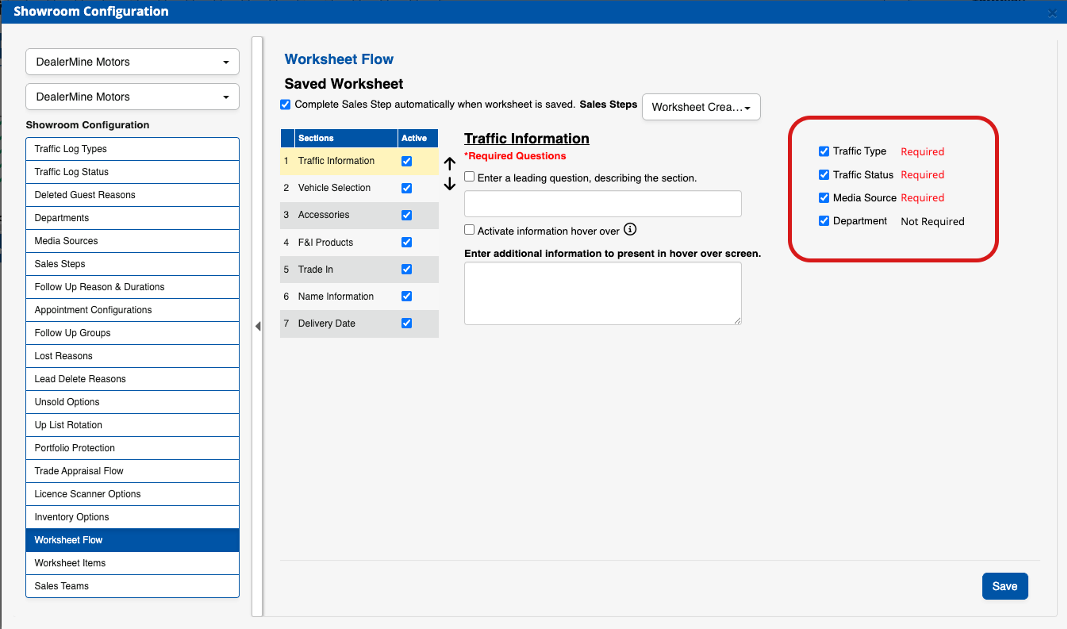
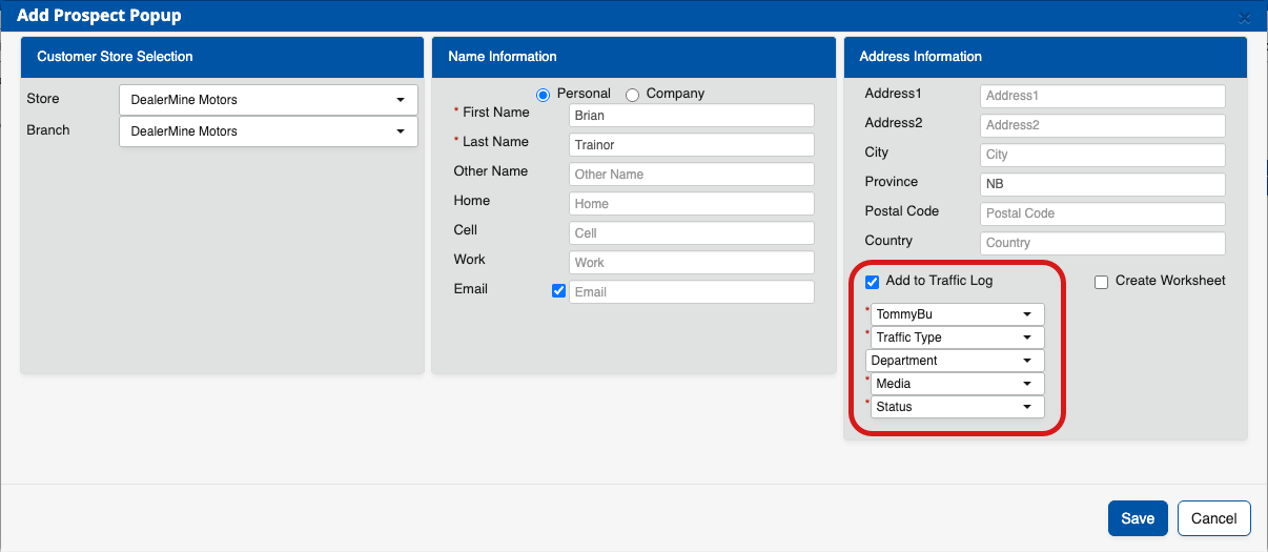
Dealerships now control exactly which fields are required when creating a prospect or adding traffic by setting up their Showroom Configuration > Worksheet Flow.
You’ll now notice:
Required fields show a red asterisk
Optional fields no longer block you from saving
Error messages are much clearer when something is missing
How This Helps You
Fewer “I don’t know what to fill in yet” headaches
Faster logging of prospects and traffic
What the dealership wants required is exactly what the CRM enforces
What You Will Notice
The Add Prospect popup is cleaner and easier to complete
Required fields no longer appear at random—they match dealership rules
If Admin sets certain fields as required, those rules now show up instantly for everyone
For more information, click on this link: Worksheet Flow - Traffic Information
3. Terminal Status – Better Handling of Closed Deals
What’s New
DealerMine now understands which statuses mean a customer’s buying journey is over (examples: Sold, Delivered, Lost, Deleted).
When a customer reaches one of these statuses:
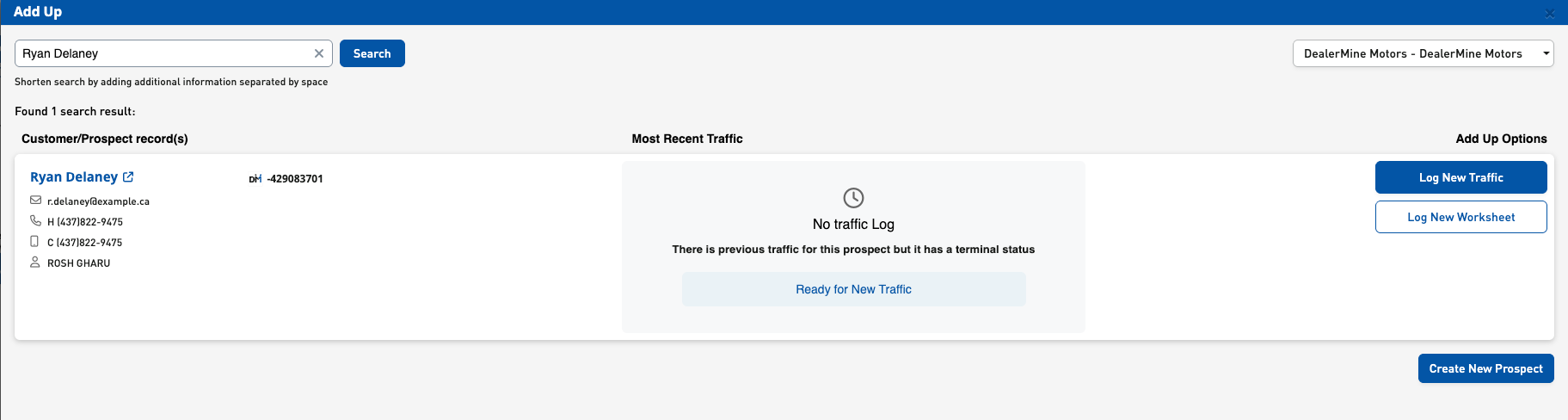
You will not be able to log another First Visit or Be-Back on that old traffic record
You will always start fresh with Log New Traffic
The CRM brings forward the customer info but starts a clean new cycle
How This Helps You
Prevents accidental logging on a closed deal
Keeps your pipeline clean and accurate
Avoids confusion across the team—everyone works the same way
Helps ensure reporting and OEM submissions are accurate
What You Will Notice
If you open the Add Up window for a customer whose most recent traffic is closed, the system will show only “Log New Traffic”
You’ll get a clear explanation when First Visit or Be-Back options don’t appearA new protected merge field—SalesApptConfirmationLink—has been added to support automated Sales Appointment confirmations (Coming Soon). This field allows dealerships to embed a one-click confirmation link in Sales-appointment email and SMS templates, and is restricted to Sales templates to maintain proper usage and consistency.
For more information, click on this link: Terminal Status
Sales CRM Fixes
Fixed an issue where entering a stock number in a worksheet didn’t auto-populate the vehicle Style. The Style now populates correctly.
We resolved an issue where certain types of Floor Traffic were incorrectly showing as First Contact instead of First Visit on the Traffic Log and Dashboard.
The problem occurred in two situations:
Using a Floor Traffic type that wasn’t Walk In
In Showroom Config > Traffic Log Types (see image), dealerships may have multiple traffic types marked as Floor Traffic, such as:
Walk In (WI)
Requested a Salesperson (RS)
Note: Not all dealerships use multiple types of Floor Traffic so this didn’t affect everyone).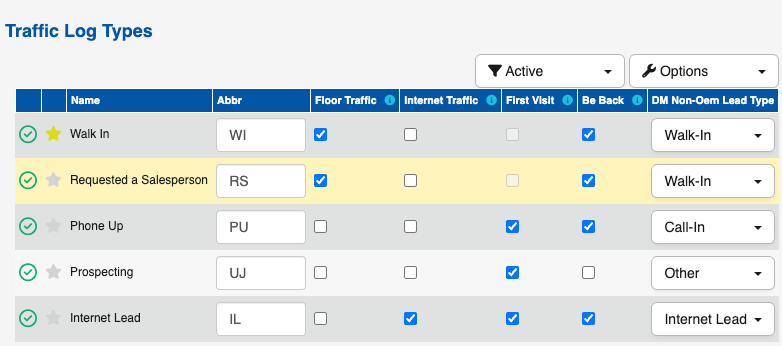
If you logged traffic using one of these non–Walk In Floor Traffic types (example: Requested a Salesperson), the CRM incorrectly counted it as a First Contact instead of a First Visit. This only affected dealerships that use more than one Floor Traffic type.
Changing a non–Floor Traffic type to a Floor Traffic type
If you:
Created traffic as something not marked Floor Traffic
(example: Phone Up, Internet Lead)Later edited it and changed the traffic type to something that is Floor Traffic
(example: Walk-In)
The CRM continued treating the traffic as a First Contact, even though it had been converted into a Floor Traffic type.
What’s Fixed
The CRM now correctly identifies all Floor Traffic types—whether selected initially or changed later—as First Visit traffic.
This ensures:
Accurate First Visit counts
Correct reporting on the Dashboard
Clean and reliable Traffic Log data
Proper handling of custom Floor Traffic types

Learn about the incredible benefits of Quorum Payroll!
Did you like this update?


