Add Up Window User Doc
1765896423738
Add Up Window – User Guide for Internal and External Stakeholders
Overview
The Add Up window provides salespeople and managers with a streamlined way to search for customer/prospect details, understand the most recent traffic activity, and take the correct next action based on First Visit, Be-Back, or Terminal Status criteria. This redesigned experience makes it significantly easier to evaluate traffic history at a glance and ensures that users take the correct action without navigating multiple windows.
The Add Up window contains three primary sections:
Customer/Prospect Record(s)
Most Recent Traffic
Add Up Options
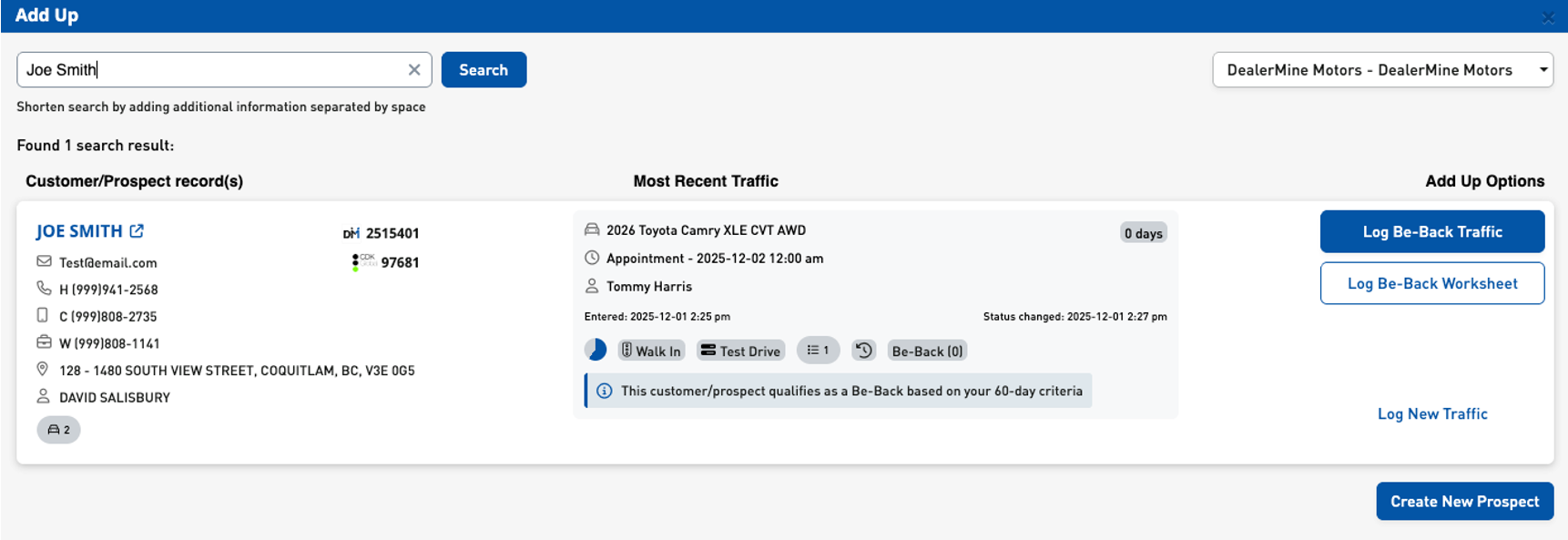
Customer/Prospect Record(s)
When a salesperson searches for a customer/prospect using the Add Up window, the first section displays all relevant profile information in a clean card layout. Each card contains:
Customer Name with link to profile
Email Address
Home Phone Number
Cell Phone Number
Work Phone Number
Address
Current Assigned Salesperson
TAG Vehicles Icon (clickable if vehicles exist)
DealerMine ID + DM Logo
Customer ID + DMS Logo (if applicable)
Most Recent Traffic
The middle section of the Add Up window summarizes the most recent traffic entry:
Vehicle of Interest
Next Scheduled Follow-Up
Salesperson on Traffic
Entered Date/Time
Status Changed Date/Time
Steps to the Sale Pie Chart (clickable)
Traffic Type Tag
Current Status Tag
Worksheet Icon with count (clickable)
Showroom History Icon
Be-Back Count
Age of Traffic Log Entry
Terminal Status Handling
If the traffic is terminal, the system displays a clear message explaining that a new visit cannot be logged.
A Terminal Status is a Traffic Log Status that indicates the end of a customer's current buying journey. Terminal statuses prevent new First Visits or Be-Backs from being added. Users will instead begin a clean buying cycle using the New Traffic button.
More information on Terminal Status Handling can be found here:
Outside First Visit / Be-Back Criteria
If the traffic is older than the configured timeframe (e.g., 60 days), the system explains why a new First Visit is allowed.
Add Up Options
Buttons appear dynamically based on:
First Visit criteria
Be-Back criteria
Terminal Status
Age of traffic
Traffic type
Possible actions include:
Log First Visit Traffic
Log First Visit Worksheet
Log Be-Back Traffic
Log Be-Back Worksheet
Log New Traffic
Create New Prospect
Create New Prospect Button
Selecting this launches the Add Prospect popup. Add to Traffic Log follows configuration:
Checked if globally enabled
Unchecked if disabled
If manually checked, 5 dropdowns populate automatically
Why This Functionality Was Created
The previous Add Up experience required unnecessary navigation and caused inconsistencies in logging. This redesign improves clarity, accuracy, and workflow efficiency.
How It Works
User clicks Add Up.
User searches for a customer/prospect.
System evaluates most recent traffic.
System displays correct Add Up actions.
User proceeds with logging or creating a new prospect.
Configuration
Showroom Config > Worksheet Flow > Traffic Information
Showroom Config > Traffic Log Status (DM-6209)
Be-Back / First Visit criteria settings
Where It Is Enforced
Add Up action window
Customer profile > Add Up
Traffic logging initiated from this window
Add Prospect popup
Expected Behavior
Correct icons and data display
Steps to the Sale is clickable
Worksheet editing works
Terminal status messaging is correct
Be-Back count increments properly
First Visit logic behaves as expected
Add to Traffic Log checkbox respects configuration
Key Benefits
Reduces mistakes when logging.
Provides complete customer context.
Speeds up traffic creation.
Ensures cleaner reporting data.
Simplifies the daily workflow.
Top 5 Reasons This Change Matters
Reduces training burden.
Prevents incorrect traffic logging.
Centralizes customer/traffic information.
Improves dealership visibility.
Modernizes a core CRM workflow.
Did you like this update?


Leave your name and email so that we can reply to you (both fields are optional):
