Worksheet Flow – Traffic Information: User Guide for Internal and External Stakeholders
Overview
The Worksheet Flow - Traffic Information configuration allows dealerships to define which fields must be completed when adding a new piece of traffic or creating a prospect in DealerMine Sales CRM. This ensures that the Add to Traffic Log section in the Add Prospect Popup enforces only the fields the dealership considers mandatory.
With this update, the CRM now accurately respects the dealership’s configuration, eliminating hard-coded requirements and allowing true flexibility in traffic creation workflows.
Mandatory Traffic Log Information
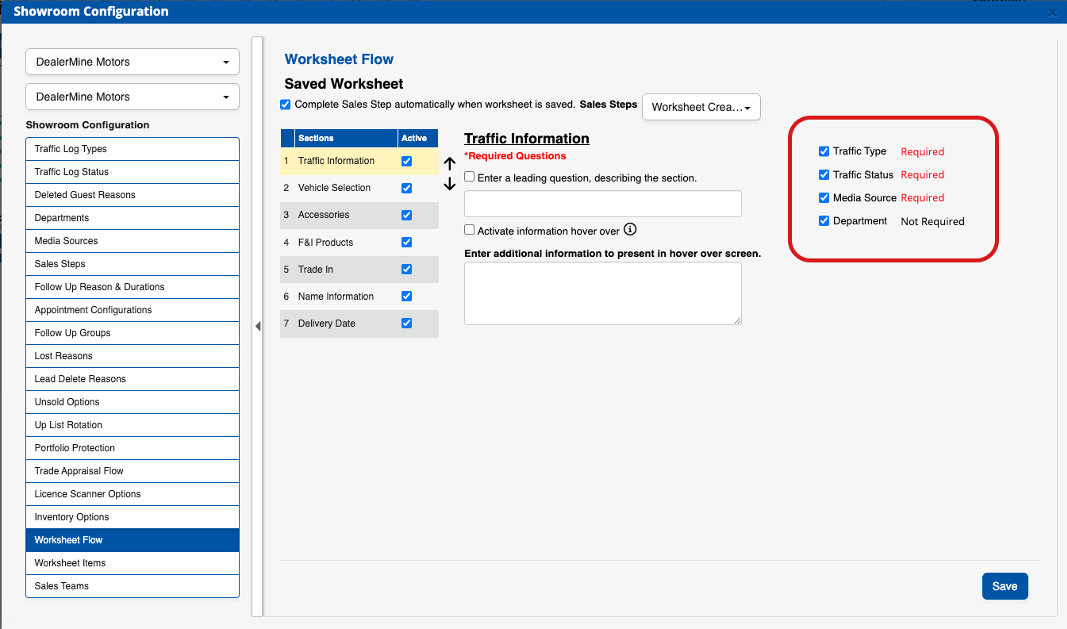
The required/not required status of the Traffic Log fields is determined entirely by the dealership’s configuration at:
Showroom Configuration > Worksheet Flow > Traffic Information
Within this section, dealership administrators mark each Traffic Information field as:
Required > Must be filled in before saving
Not Required > Optional; does not block saving
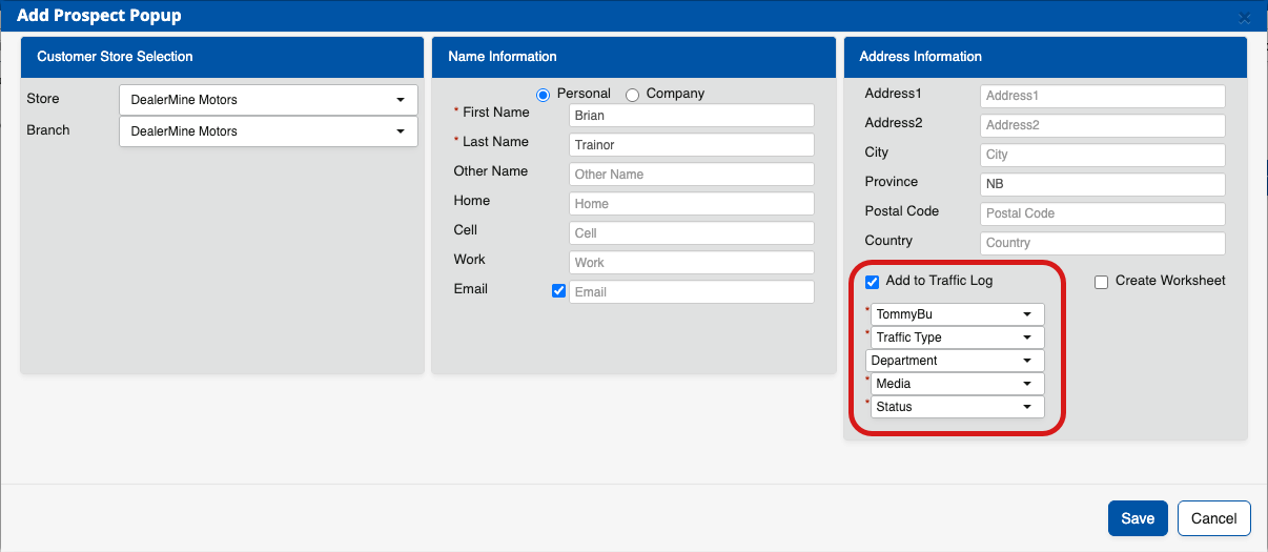
The Add Prospect Popup automatically reflects these settings:
Required fields display a red asterisk (*)
Optional fields show no asterisk
This alignment ensures that salespeople are only prompted to complete fields that are truly part of the dealership’s Traffic Workflow. Why This Functionality Has Been Created
This enhancement was introduced to solve an important problem:
Previously, the CRM enforced a fixed set of required fields, regardless of how the dealership configured its Traffic Workflow. This caused:
Unnecessary save errors
Confusion among salespeople
Incorrect assumptions about what was truly required
A mismatch between system behavior and dealership rules
The new functionality ensures perfect alignment between configuration and front-end validation, improving speed, accuracy, and user experience.
How Does it Work?
Dealership Sets Requirements
In Showroom Configuration > Worksheet Flow > Traffic Information each field is marked Required or Not Required.
The Add Prospect Popup Reads This Configuration
When a user opens Add Prospect and checks Add to Traffic Log, the system displays:
Required fields with a red *
Optional fields without an *
Validation Happens When the User Clicks Save
Required fields > must be filled
Optional fields > can be blank
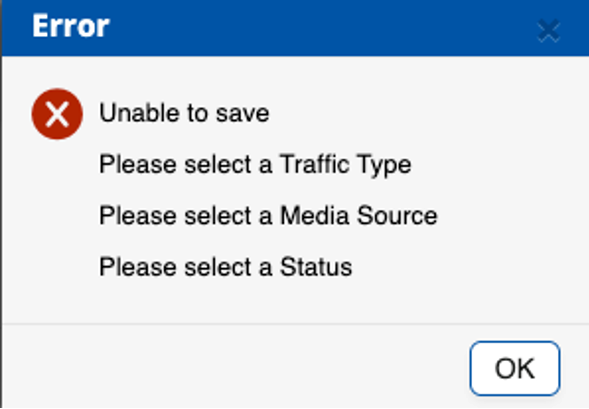
Errors Are Clear and Specific
If a required field is missing, the system shows:
Configuration Updates Take Effect Immediately
No refresh or restart needed - the front end picks up changes instantly
How to Configure Terminal Status
Navigate to: Showroom Configuration > Worksheet Flow > Traffic Information
Review the list of Traffic Information fields (e.g., Traffic Type, Status, Department, Media)
For each field, click the Required text. Clicking it changes it from required to not required and vice-versa
Click Save
All users will immediately see the updated requirements marked in the Add Prospect Popup
Where Is It Enforced
Add Prospect Popup
Key Benefits for Dealerships
Configurable Workflows
Dealerships decide what must be captured, giving them total control over Traffic Information requirements.
Fewer Save Errors
Salespeople avoid preventable validation errors and complete prospects more quickly.
Clear Visual Indicators
Required fields are clearly marked with a red asterisk, reducing confusion.
System Consistency
Desktop CRM, SMA, and Traffic Workflow settings finally behave in harmony.
Immediate Impact
Any configuration changes apply instantly without system updates or downtime.
Top 5 Reasons Terminal Status Matters
Respects Dealer Customization Every dealership operates differently — this update ensures the CRM reflects their actual workflow.
Reduces Training Overhead Salespeople no longer need to learn inconsistent or unexpected rules.
Improves Data Quality Only required fields are enforced, ensuring accurate data collection without overburdening users.
Decreases Support Tickets Better alignment reduces inquiries about “why won’t this save?”
Re-enacts “No Status” filter By removing hard-coded rules, dealers that were used to using the No Status filter on the Traffic Log in the past, can do so again with enhanced traffic creation workflows (Add Up window)
Did you like this update?
{error_message}
Leave your name and email so that we can reply to you (both fields are optional):