Sales Appointment Configuration User Doc
1771519778018
Sales Appointment Configuration User Guide for Internal and External Stakeholders
Overview
Sales Appointment Configuration is a rules-based automation that controls when and how customers are contacted throughout the sales appointment journey.
It ensures customers receive timely, consistent communication before and after their appointment without requiring manual follow-up from dealership staff.
Why Sales Appointment Configuration Has Been Created
Sales Appointment Configuration was created to solve common dealership challenges:
Missed or forgotten follow-ups
Inconsistent appointment confirmations
Low show rates
Manual work for sales staff
Limited visibility into what customers were contacted and when
By automating appointment-related communication, dealerships can focus on selling while the system handles consistency and timing
How Does Sales Appointment Configuration Work?
Sales Appointment Configuration listens for appointment-related events in the system and evaluates a set of rules.
When an appointment event occurs, the system checks:
Which stage of the appointment lifecycle has been reached
Whether communication is enabled for that stage
Which channel should be used (Email, SMS, or both)
Whether the message has already been sent
If all conditions are met, the message is sent automatically and logged in the customer’s history.
When an email is sent to the customer:
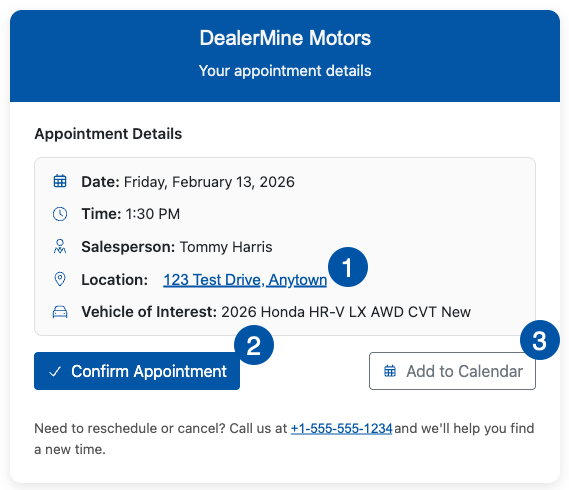
The appointment date and time are clickable, allowing the customer to save the appointment to their local calendar.
The appointment location is clickable and opens the customer’s default map application for directions.
Customers can confirm their sales appointment directly from the communication. When confirmed, the appointment is updated in DealerMine, and the confirmation is reflected in the Work Plan.
How to Configure Sales Appointment Configuration
Sales Appointment Configuration is set up by defining automated messages for each stage of the sales appointment lifecycle. Each automated message controls when, how, and under what conditions customers are contacted.
Dealerships can create custom appointment reasons and mark them as “Is Appointment” in the Showroom Configuration > Follow Up Reason & Durations window:
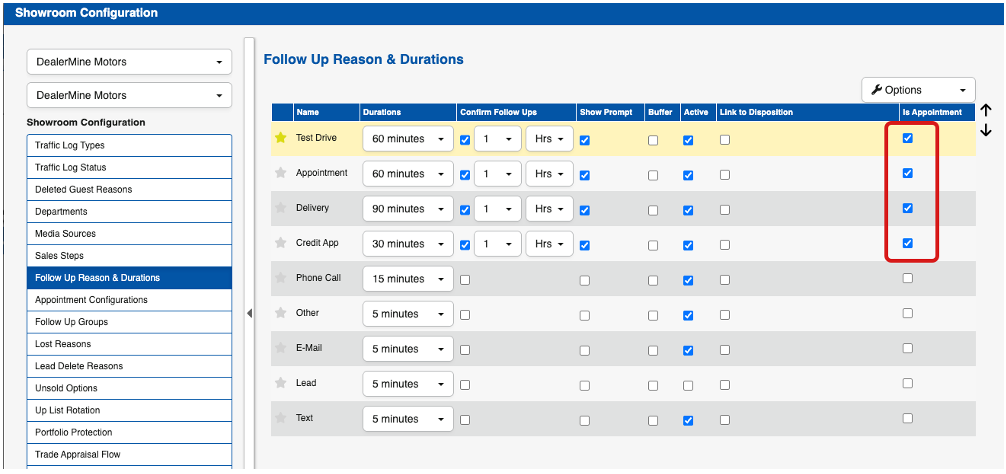
Some examples of custom appointments are:
Credit Application
Test Drive
Delivery
Other dealership-defined reasons
Once saved, these appointment reasons will populate in the Showroom Configuration > Appointment Configuration window.
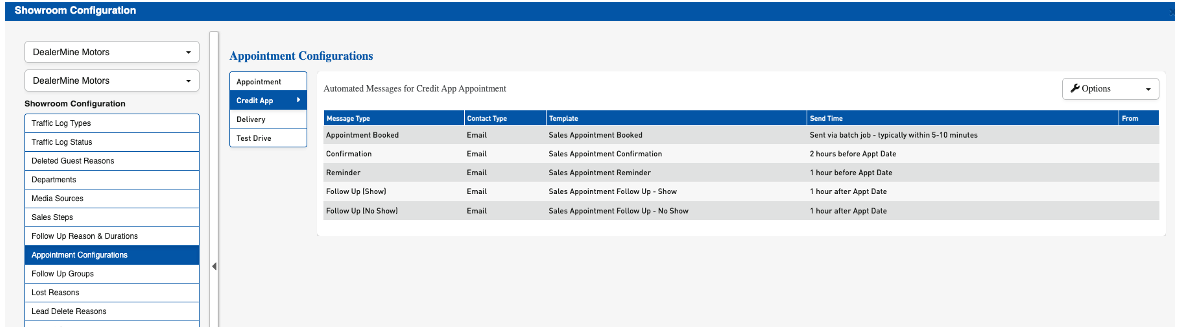
Configuration is completed by adding one or more automated messages and associating them with specific appointment events.
Adding an Automated Message
When adding an automated message, users must first select a Message Type. The available message types are:
Appointment Booked
Confirmation
Reminder
Follow Up
Each message type is configured independently and supports different timing and triggering rules.Why This Functionality Was Created
Contact Type
For all message types, users select a Contact Type:
Email
SMS
If SMS is selected, a dealership text line must be chosen from the From Text dropdown. This determines which phone number the message is sent from.
Templates
All sales appointment templates are created and managed in Templates & Batch Setup under the new category: Sales Appointments.
When configuring an automated message:
Select the appropriate template from the Template dropdown
Templates can be viewed or edited directly from the configuration screen by clicking the Edit Template icon
Merge Fields for Sales Appointment Configuration:
<< SalesAppointmentDate >>
<< SalesAppointmentTime >>
<< SalesPerson >>
<< SalesAppointmentReason >> (New)
<< SalesTeamManager >> (New)
<< SalesApptConfirmationLink >> (New)
These New merge fields:
Can only be used when the Batch Only checkbox is enabled on the template
Allows customers to confirm their appointment directly from the message
Writes the confirmation back to DealerMine and updates the appointment in the Work Plan
Send Time Configuration
Send time behavior depends on the message type.
Appointment Booked
Send time is fixed
Messages are sent via batch job, typically within 5–10 minutes of the appointment being created
Confirmation & Reminder
Send time is fully configurable
Timing is defined using four fields:
Number
Timeframe (Hours, Days, or Weeks)
When (Before or After)
Event (Appointment Date)
Follow Up
Examples:
Send confirmation 3 days before the appointment date
Send follow-up 1 day after the appointment date
All four fields are required before the message can be saved.
Follow Up Messages (Show / No Show)
For the Follow Up message type, users must also select a Follow Up Type:
Show
No Show
This selection determines when the message is triggered and is based on the outcome recorded when a completed sales appointment follow-up is entered in the system.
Saving and Enforcement
Once configured and saved:
Automated messages apply to all future sales appointments
Messages are triggered automatically based on appointment events and timing rules
All messages and confirmations are logged in the customer’s communication history
Where Is Sales Appointment Configuration Enforced
Sales Appointment Configuration is enforced at the system level whenever:
An appointment is booked or updated
An appointment reaches a key lifecycle stage
A show or no-show outcome is recorded
A customer confirms their appointment through automated communication
All automated messages are tracked and visible within the customer’s communication history.
Cool Features to increase Appointment Shows
Emails now include:
Clickable location (opens default map app)
One-click appointment confirmation link
Add to Calendar button
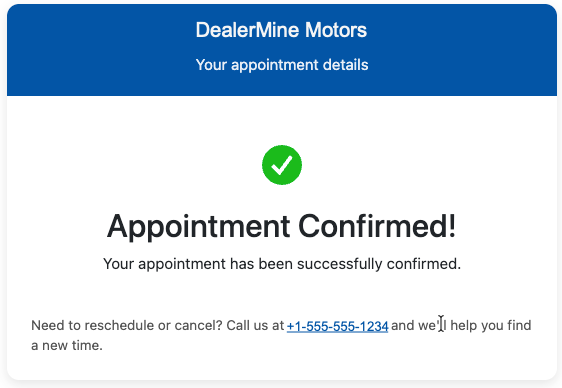
When a customer confirms:
The appointment updates automatically in DealerMine
The Work Plan reflects the confirmation - the confirmed checkbox is checked
Key Benefits of Sales Appointment Configuration for Dealerships
Improves appointment show rates
Reduces manual follow-up tasks for sales staff
Enables customers to confirm appointments themselves
Makes it easy for customers to save appointments and get directions
Delivers consistent and professional communication
Ensures no duplicate or missed messages
Provides visibility into customer contact history
Top 5 Reasons Sales Appointment Configuration Matters
Customers know what to expect and when
Appointments are easier for customers to attend and confirm
Sales teams spend less time on repetitive tasks
Follow-ups happen even when staff are busy
Managers and support teams can easily audit activity and appointment trends
Did you like this update?


Leave your name and email so that we can reply to you (both fields are optional):
