Release Notes V 9.8.0 - April 2026
1776160800000
Pilot Release Date: Tuesday, Apr 14/26
Production Release Date: Tuesday, Apr 21/26
Introducing MORI AI — Now Live!
Answer every call. Book more appointments. Never miss revenue again.
MORI is your 24/7 virtual agent that handles ALL service appointments, routine requests, and sales inventory questions instantly — booking directly into your DMS in real time with a natural, conversational experience customers actually enjoy.
No more missed calls. No more wait times. No more frustrated customers walking away.
CLICK HERE to learn more and hear MORI in action!
Migration to New Tech Stack
We’ve recently completed a major upgrade to our technology stack to improve performance and reliability. As with any transition of this scale, there were some temporary slowdowns over the past couple of weeks while we worked through the initial issues.
We are happy to share that all outstanding items have now been resolved. Thank you sincerely for your patience during this time—we know how important DealerMine is to your business, and this upgrade was made with that in mind.
Service CRM Fixes
MORI AI: We have updated the name of the Dashboard tab from “Engage AI Agent” to “MORI AI” to better reflect the brand and persona.
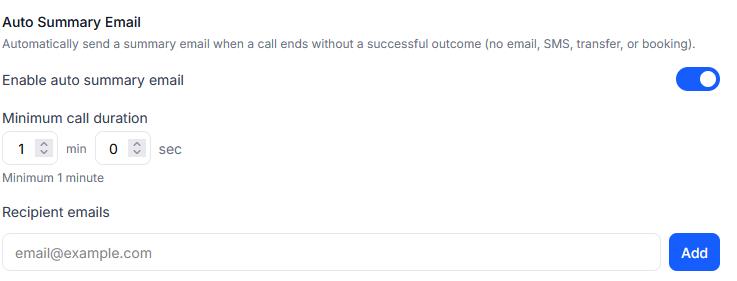
MORI AI: You can now set an email address to receive a summary of any short calls that end prematurely to ensure you are still able to follow up on them when necessary.
OLS Fixes
Recall Integration: There was an issue where recalls for incorrect OEMs were displaying when booking an off-make. This has been resolved.
DMS Fixes
QDMS - There was an issue where SC Code and DealerMine Transportation type were not properly syncing. This has been resolved.
Sales CRM
New Section on Dashboard for BDC Lead Performance
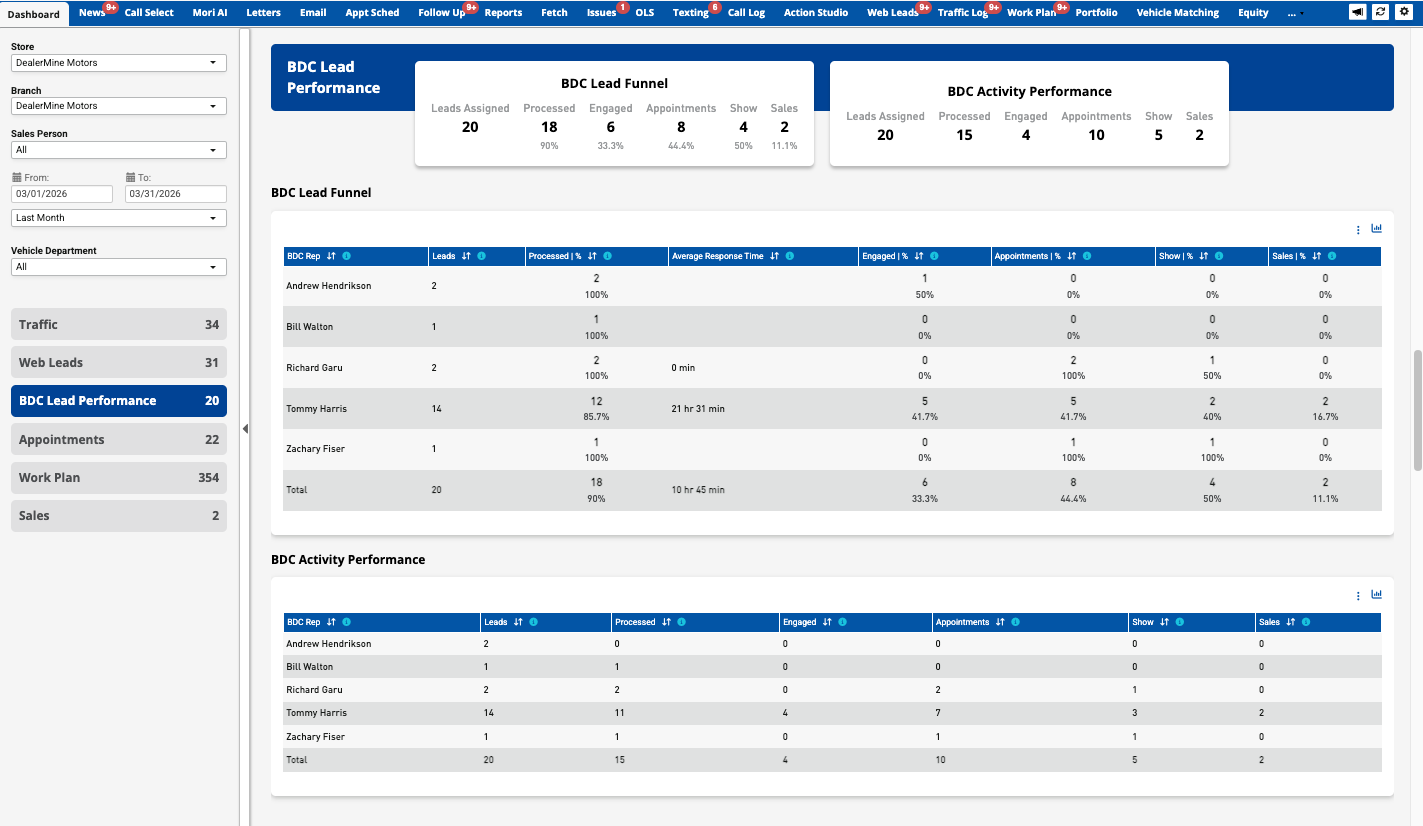
We’ve introduced two distinct views in the BDC Lead Performance section of the dashboard to provide better insight into both conversion effectiveness and team activity.
BDC Lead Funnel
BDC Activity Performance
BDC Lead Funnel
The BDC Lead Funnel provides a cohort-based view of performance by tracking leads assigned within the selected timeframe through key stages of the sales process.
This view shows how effectively leads are converted by the BDC team, including progression through:
Processed
Engaged
Appointments
Shows
Sold
Because the same set of leads is followed across all stages, conversion rates are consistent and meaningful. This view is best used to evaluate BDC effectiveness and lead conversion performance.
BDC Activity Performance
The BDC Activity Performance view provides an event-based summary of BDC activity within the selected timeframe.
Each metric is calculated independently based on when the activity occurred, regardless of when the lead was originally assigned. This includes:
Leads assigned
Leads processed
Appointments created
Shows
Sales
This view may include activity from leads assigned in previous periods and is best used to evaluate BDC productivity and overall output.
Key Difference
The BDC Lead Funnel measures how well leads convert, while BDC Activity Performance measures the volume of work completed by the BDC team within a given timeframe.
Sales CRM Fixes
Duplicate Emails: Fixed an issue where Unsold Schedule emails could be sent multiple times to the same customer during a single scheduled run. Unsold Schedule email jobs now send only one email per customer per execution.
Sales Appointment Confirmation Links: Fixed an issue where Sales Appointment confirmation links could fail to load for customers. Appointment confirmation links now open correctly on both desktop and mobile so customers can confirm their appointments without errors.
Dashboard (Floor Traffic - Steps to the Sale): Fixed an issue where the Floor Traffic - Steps to the Sale report could show missing data in the main grid. The report now displays the expected grid values correctly while keeping drill-through data aligned.
Printing Leads from View Details: Fixed an issue where clicking Print in the lead View Details window did not respond and could trigger a console error. Lead details can now be printed successfully from the View Details modal.
Themes Persist: Fixed an issue where a user’s selected theme could revert to Default after logging out and back in. Chosen themes now save correctly and remain applied on future logins.
Web Leads History Error: Fixed an issue where filtering Web Lead History by certain lead sources could cause an error and prevent results from loading. Lead History filters now work correctly for all valid lead sources, including email-domain style sources.
Sales Appointment Text Messages Now Available in Texting Filters: Fixed an issue where text messages sent from Sales Appointment Configuration were not visible in the Texting tab filters. Users can now select Sales Appointment in the Contact Type filter and view those messages correctly.
Salesperson Menu on Add Up Screen Showing PAs from All Stores: Fixed an issue where the Salesperson list in the Add Up window could display users from all stores in the dealer group. The list is now filtered based on the logged-in user’s store access so only relevant salespeople appear.
Dashboard Drill-Through Steps to the Sale Performance Improvement: Improved performance of the Dashboard drill-through for Steps to the Sale by loading step data on demand instead of pre-calculating all records upfront. This reduces processing overhead and makes the drill-through faster and more responsive.
Style/Trim Now Populates on Worksheets for Stock Vehicles: Fixed an issue where Style/Trim did not populate on worksheets when searching by stock number for certain inventory vehicles. Worksheets now correctly populate the vehicle style information, including for dealerships without Autovance Chrome enabled.

Did you like this update?


