Release Notes - 2.24.0 June 2026
1782824871768
Sales Mobile App 2.24 SMA Release Notes
What's New in the DealerMine Sales App
New Features & Enhancements
Traffic Log - Redesigned Traffic Cards and App-Wide Visual Refresh
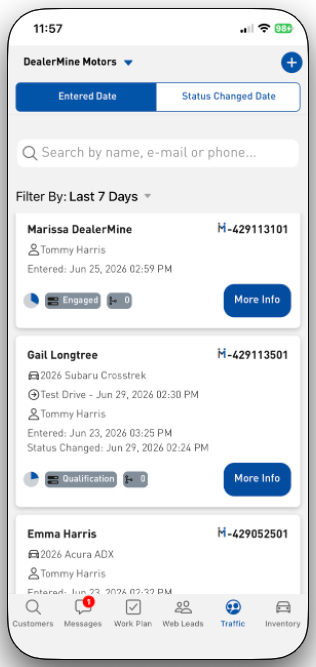
The Traffic Log has been updated with a refreshed look and feel across the app. Traffic entries now display as clean, elevated cards with rounded corners and consistent spacing - matching the style of the Web Leads screen. Cards show both the entered date and status changed date, giving you more context at a glance. Navigation controls across all screens have been cleaned up, long dealership names now truncate neatly, and the DIN font is now applied consistently throughout the entire app on both iOS and Android.
Traffic Log - Filters Now Persist When Closing the Filter Panel
When you open the Traffic Log filter panel and close it without applying changes, your previously selected filters are now preserved. Closing the panel with the X button no longer clears your filters. Any filters you have applied will stay in place whether you open the panel, make changes, and close without applying, or simply browse and exit. Your filter selection can also no longer be left blank.
Traffic Log - Significantly Faster Load Times
The Traffic Log now loads dramatically faster. Previously, the app was retrieving your entire traffic history before applying the selected time filter, which could result in load times of 10 to 30 seconds. Filtering is now applied on the server before data is returned, reducing load times by approximately 90 percent. This improvement applies when opening the Traffic Log, changing the time filter, or swiping down to refresh.
Traffic Notes - Improved Note Entry Layout
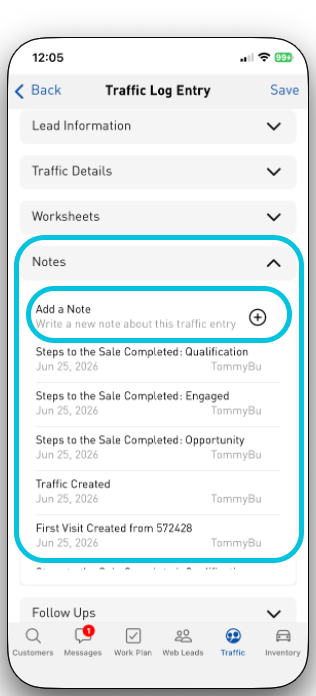
Adding a note to a piece of traffic is now faster and easier. The Add Note button and text entry field are now anchored at the top of the notes section, so you no longer have to scroll through a long list of notes to reach the entry field. Existing notes are displayed in a scrollable section below, keeping everything accessible without losing your place.
Sales Mobile App Fixes
Fixed an issue where broadcast leads could become permanently stuck and unclaimable after a salesperson received a lead notification and then force-closed the app or let the broadcast timer expire while the app was minimized. Leads in this state would show as assigned with no way to process them. The app now correctly releases the lead in all of these scenarios so it can be re-broadcast to the team.
Fixed an issue where the address lookup field on the Add Prospect and Edit Customer screens was displaying a Google Maps error popup when a user began typing an address. Address autocomplete now works correctly without any interruption.
Fixed an issue where impersonating a user who had the "Force Change Password" flag enabled was causing the app to crash. The impersonated user's name was not displaying in the settings menu and the session was unusable. Impersonation now works correctly regardless of the target user's password status.
Fixed an issue where notes added to a piece of traffic in the Sales Mobile App were not appearing in the Notes tab in the desktop Showroom History. The notes were visible under the All tab but were missing the correct flag that categorizes them as notes. Notes added from the mobile app now appear correctly in the desktop Showroom History under the Notes tab.
Fixed an issue where reassigning a web lead to yourself in desktop Showroom History was triggering two "Lead Assigned" push notifications on the Sales Mobile App instead of one. Only a single notification is now delivered in all reassignment scenarios.
Creating traffic now automatically checks your steps to the sale. When you add a new customer/prospect to the Traffic Log and select a status, the app will now automatically check off the matching Steps to the Sale for you. No more manually updating steps after the fact. This is based on your dealership having sales steps automated from traffic status.
If a customer has opted out of email, the compose button is now greyed out so you know right away that email isn't available for that person. Previously the app would show a confusing "Error" message with no explanation. Now it's clear - no guesswork.
Fixed an issue where customer profile edits were not saving properly. If you've ever updated a customer's phone number, email, or other profile details in the app and come back to find the old information still showing - that's fixed. Your edits now save properly and stay saved.
Fixed an issue where the email screen used to flash "No emails found" for a split second before your messages loaded. That flicker is gone. The inbox now loads cleanly.
The Add Customer button in the Customers section is fully displayed
Customer work phone numbers now display with proper formatting
Good to Know
This update also includes behind-the-scenes improvements to push notifications, which means you should receive app notifications more consistently and reliably going forward. No action needed on your end.
Feedback
As the Product Manager, your feedback is invaluable in shaping the DealerMine Sales CRM experience. Whether it's about the Sales Mobile App or anything CRM-related, I'd love to hear from you!
Did you like this update?


Leave your name and email so that we can reply to you (both fields are optional):
